
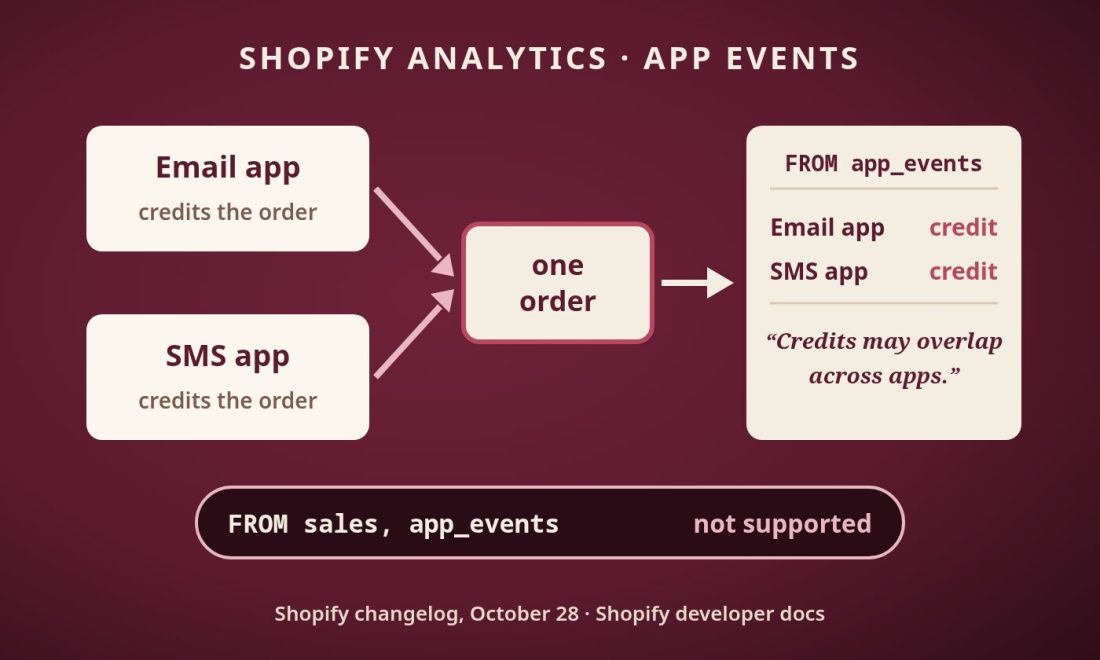
Shopify app events are now part of Shopify Analytics. In its October 28 changelog post, Shopify said you can “view events from supported apps directly in Shopify Analytics,” such as marketing emails sent or loyalty rewards redeemed. Read it as a log of what installed apps report. Shopify’s own documentation describes revenue credited by apps as something that “may overlap across apps.”
What are Shopify app events?
Shopify app events are activity records that installed apps send to Shopify, such as an email sent by a marketing app or a reward redeemed in a loyalty app. You pick metrics from the App Events category in a report, or query FROM app_events in ShopifyQL, and group results by app or by time period. What appears depends on which installed apps support app events and what they send to Shopify.
The changelog lists three uses: track app activity over time, compare the same metric across apps, and filter or group by details an app provides, such as campaign or message type. The ShopifyQL syntax page gives this example:
FROM app_events SHOW emails_sent GROUP BY app_name TIMESERIES day SINCE -30dGrouping by app_name is how you compare one metric across apps. Shopify’s registry notes that multiple email apps can declare the same event, so merchants can query emails_sent by app.
Can two apps claim the same order in Shopify Analytics?
The documentation allows for it. The standard event registry includes shopify.marketing.conversion_attributed. It requires an order_id and accepts optional fields such as attributed_revenue, campaign_id, channel and attribution_model. The registry defines its revenue metric, attributed_conversion_revenue, as “Merchandise revenue credited by reporting apps, after discounts and excluding tax and shipping. Credits may overlap across apps.”
So each marketing app reports its own credit, and the same order may appear in more than one app’s credited revenue. Overlap is a familiar problem. Our look at the BVDW paper shows how affiliate touchpoints under last click differ from affiliate participation; that gap runs the other way, but it carries the same warning about reading one view’s credit as the full picture.
Reconciling against sales is the second obstacle. The ShopifyQL page says: “You can’t query the app_events dataset together with another dataset in the same query. For example, FROM sales, app_events isn’t supported.” The developer docs repeat the rule. In short, the docs do not let you put app-credited revenue and sales in one query.
What limits apply to Shopify app events data?
The data is only as complete as the apps behind it. Shopify says it depends on the installed apps and on whether each app’s developer sends events. Custom events add another wrinkle: query results and CSV exports use “the labels that the app gives them,” so naming is up to each app.
Money has its own rule. Shopify says an omitted amount means the app hasn’t reported it, and money totals include only reported amounts in the declared currency. Shopify doesn’t convert these amounts into another currency.
| Data | Available for | Note |
|---|---|---|
| Attributes | 30 days | Filter and group |
| Count and sum metrics | Up to 365 days | Hourly summaries, no attribute breakdowns |
| Custom-event dimensions | Last 30 days | Labels set by the app |
The first two rows come from Shopify’s developer documentation; the custom-event row comes from the ShopifyQL syntax page.
What should merchants and analysts do with app events?
Start with the safe use: compare a metric by app_name, such as emails sent by each marketing app. Then treat app-credited revenue as each app’s claim. Do not sum it across apps, since Shopify says those credits may overlap. Separately, the registry says to keep offer stages, attribution, inventory operations and claim lifecycle stages apart, and not to “add their metrics together as a combined financial total.”
Next, check which installed apps actually send events. A gap in the report may only mean an app isn’t sending, so confirm per app before reading anything into it. For money totals, check the currency each app declares, since Shopify won’t convert it for you.
Finally, keep your sales numbers as the reference and run credited revenue as a separate query beside them. For another look at Shopify’s reporting additions, see our piece on the dedicated admin section for ChatGPT and Copilot channels.