
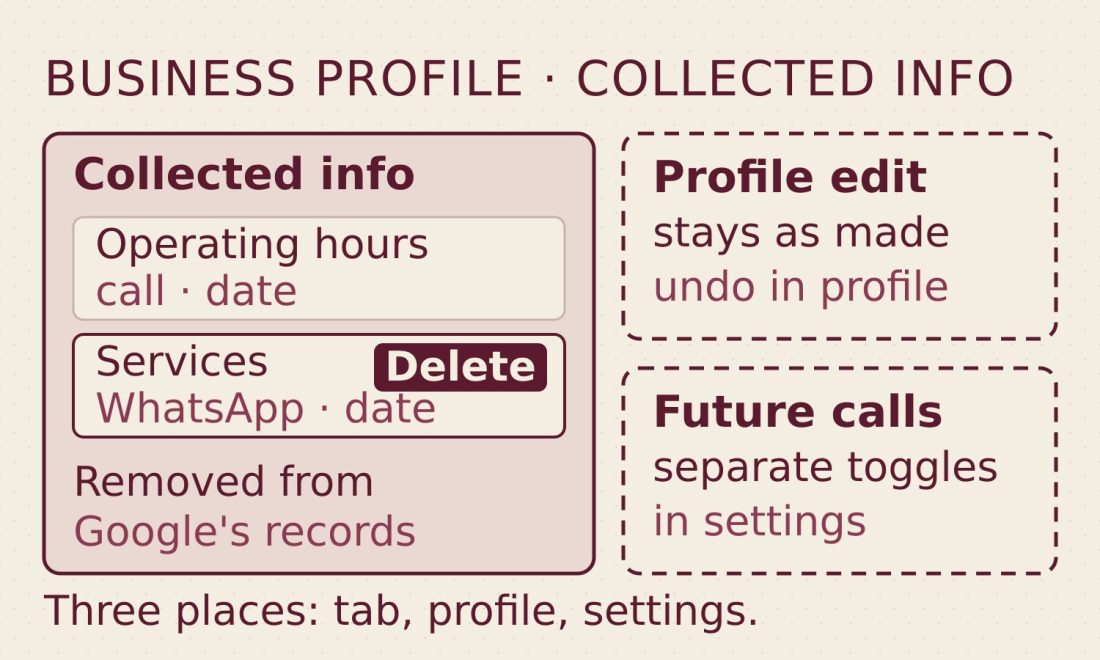
Google announced on September 14 that a “Collected info” tab is now live inside the Business Profile dashboard, reachable from Edit profile. The tab lists details gathered through automated calls, texts or WhatsApp messages, each shown with a source and a date, in the language it was originally given. Deleting an entry does not undo whatever change that outreach already made to the business’s profile.
What Google Posted, and What the Help Pages Already Said
Google’s Business Profile account posted the news on X on September 14: “You can now review details verified by Google’s automated assistant right inside your Business Profile dashboard. Head to the ‘Collected info’ tab to see what was gathered and delete any outdated details.” The link in that post leads to Google’s help page on editing a Business Profile, which spells out the mechanics: Google “may occasionally reach out using automated messages via call, text, or WhatsApp to the verified phone number on your profile,” and whatever a business says in response “may be used to update your profile.” Search Engine Land covered the post the same day, quoting the dashboard’s own description of the tab: the information was “collected in phone or chat conversations with your business” to match the business with customers looking for similar services.
The tab itself predates the announcement. The help-page section behind it was reported by Search Engine Roundtable on June 22, and Search Engine Roundtable published screenshots of the live tab on July 13. What September 14 changed is that Google announced the feature itself.
What is the Collected info tab in Google Business Profile?
The Collected info tab sits under Edit profile in the Business Profile dashboard and lists details Google gathered about a business through automated calls, texts or WhatsApp messages, each with a source and a date, shown in the language it was originally given. A business can review each entry for accuracy and delete individual ones it no longer wants recorded. Google’s help page notes the feature is “currently available for select regions, languages, and business categories” and “may not be available for all users.”
The Ledger: Four Entries, Three Places to Act
The same read-the-document method that applied to LG’s smart-TV consent agreements works on this pair of help pages too: each item Google names maps to one control, and the control is not always the tab.
| Entry | What Google’s help says happens | Where you act |
|---|---|---|
| A note in the Collected info tab | “If you want to remove a piece of information, select Delete → Delete.” | Collected info tab |
| A profile edit made from a call | “Any updates made to your Business Profile on Google Search and Maps as a result of these calls are reviewed and marked as ‘Pending.’ The review might take up to 5 business days.” | Your profile |
| A post Google made on your behalf | “Whenever Google uses info from your conversation to post on your behalf, you receive an email notification of the update.” | Your profile |
| Future automated calls or texts | “If you don’t want your business to receive automated calls or texts from Google, you can tell us over the phone or change your Business Profile settings.” | Advanced settings, or the caller |
Row one is where Google’s own tip matters most:
“Deleting collected information removes it from Google’s records but does not change other details already on your Business Profile.”
— Google Business Profile Help, “Edit your Business Profile”
Deleting a note removes it from Google’s records. It does not change the edit in row two or the post in row three; those need their own visit to the profile. None of the four rows is among the seven metrics in GA4’s Business Profile link, which reports interactions such as calls, bookings and directions, not changes made to the listing itself.
Two Gates That Don’t Match
The Collected info tab and Google’s automated calls are not gated the same way. Google’s help page on editing a Business Profile limits the tab itself to “select regions, languages, and business categories,” with no list of exclusions attached. A different section of Google’s help page on automated calls and texts covers a specific category of call: the ones Google places on a customer’s behalf to book an appointment, check a restaurant’s wait time, or confirm the price and availability of a product or service. That category is “currently available only in select regions and languages”; in the US, it is available “in all states except Indiana, Louisiana, Minnesota, Montana, and Nebraska.” The exclusion belongs to the customer-request calls, not to the tab.
Whether the customer-request calls feed the tab at all is not stated on either page. The dashboard copy Search Engine Land quoted describes the tab’s contents as information “collected in phone or chat conversations with your business,” language broad enough to cover Google’s own confirmation calls or the calls it places for a customer’s booking, wait-time check, or price request. Neither help page draws that line, so this piece does not draw it either.
Three separate places, then, for anyone checking a listing after September 14: the Collected info tab to review and delete notes, the profile itself to edit or remove whatever a call already changed, and Advanced settings, or a sentence to the caller, to stop future automated calls or texts. Text and WhatsApp threads have their own replies: STOP to opt out of the messages, DELETE to erase the messages exchanged with that number. Google’s help page also says that after opting out “you may still occasionally get manual calls from Google to confirm your business information.”