
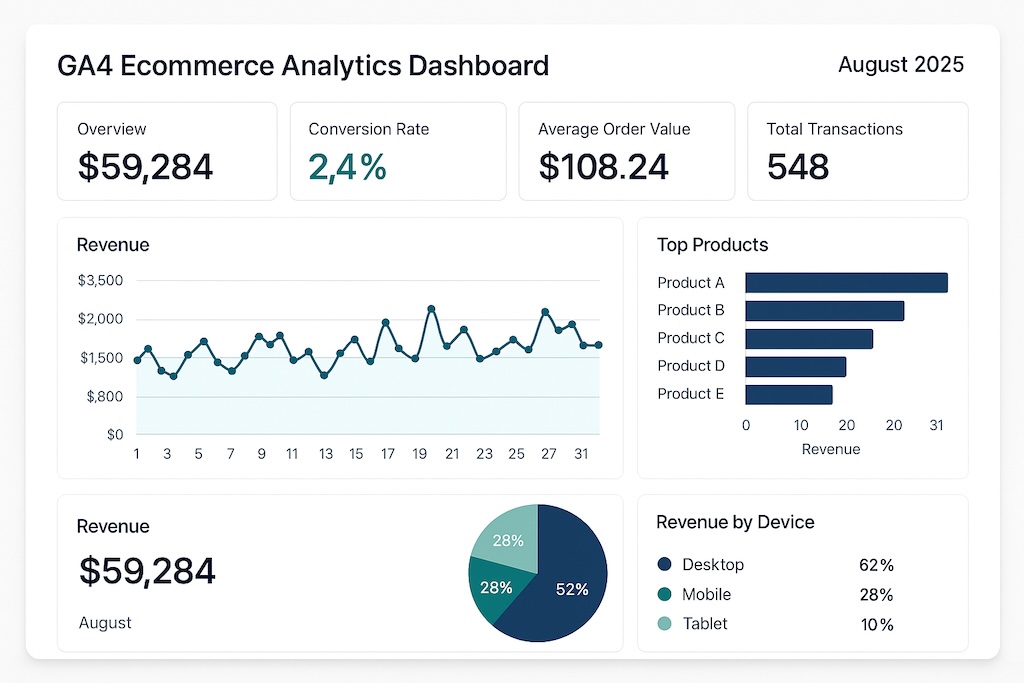
Google Analytics 4 delivered a significant breakthrough for e-commerce businesses on August 25, 2025, by dramatically expanding access to item-scoped dimensions and metrics across all reporting tools. The update eliminates longstanding barriers that restricted how merchants could analyze product performance, making e-commerce data fully available in secondary dimensions, filters, comparisons, and custom report configurations. For the estimated 14 million websites running GA4, this change fundamentally alters how product-level data flows through the analytics pipeline.
This enhancement represents one of the most requested features from the e-commerce analytics community. Previously, certain e-commerce dimensions and metrics remained siloed within specific reports, forcing analysts to create workarounds or accept incomplete data views when building comprehensive dashboards. The August update removes these artificial limitations, enabling seamless integration of product-level data with broader business metrics across Explorations, Looker Studio, and the Google Analytics Data API.
What Changed: Item-Scoped Data Access Across All Reports
The core improvement centers on universal accessibility of e-commerce dimensions—both default and custom—within GA4’s reporting ecosystem. Analysts can now layer product categories, brand information, and custom item attributes as secondary dimensions across any report type. This means traffic analysis can be segmented by product performance, audience insights can incorporate purchase behavior, and conversion funnels can include detailed item-level attribution.
Match type support has also been expanded significantly, with all comparison operators now functional for e-commerce dimensions in filters and comparisons. The previous restriction to exact matches has been eliminated, except when reports include event-scoped metrics, maintaining system performance while maximizing analytical flexibility. Analysts can now perform partial string matches using contains, starts with, or ends with operators—a capability that enables sophisticated product analysis using regular expressions and range-based filtering.
As analytics expert Simo Ahava noted in his comprehensive GA4 ecommerce implementation guide, structuring the data layer correctly is the foundation of all downstream reporting. “Test your setup in staging before going live. It’s easier to fix issues early,” Ahava advises—a principle that applies doubly now that item-scoped data surfaces across more report types than ever before.
GA4 E-commerce Events: The Complete Tracking Framework
GA4’s e-commerce tracking operates on an event-based model where each customer action fires a specific event with structured parameters. Unlike Universal Analytics, where Enhanced Ecommerce used a plugin architecture, GA4 treats every interaction as a discrete event carrying an items array with product details. Understanding these events is essential—miss a required parameter, and GA4 treats the event as a generic custom event that never appears in monetization reports.
The full e-commerce funnel in GA4 maps to these recommended events:
| Event Name | Trigger Point | Required Parameters | Business Impact |
|---|---|---|---|
view_item_list | User views a product listing page | item_list_id, item_list_name, items[] | Measures catalog browsing patterns |
select_item | User clicks a product from a list | item_list_id, item_list_name, items[] | Identifies high-interest products |
view_item | User views a product detail page | currency, value, items[] | Tracks product page engagement |
add_to_wishlist | User adds item to wishlist | currency, value, items[] | Signals purchase intent |
add_to_cart | User adds item to shopping cart | currency, value, items[] | Key conversion micro-event |
remove_from_cart | User removes item from cart | currency, value, items[] | Identifies friction points |
begin_checkout | User initiates checkout process | currency, value, items[] | Checkout funnel entry point |
add_shipping_info | User submits shipping details | currency, value, shipping_tier, items[] | Shipping step completion rate |
add_payment_info | User submits payment method | currency, value, payment_type, items[] | Payment step conversion |
purchase | Transaction completes successfully | transaction_id, currency, value, items[] | Revenue attribution |
refund | Transaction is refunded | transaction_id, currency, value, items[] | Revenue accuracy |
Each event’s items array supports up to 27 custom parameters per item, including item_id, item_name, item_brand, item_category (with up to five hierarchy levels), price, quantity, coupon, and discount. The purchase event additionally requires a unique transaction_id to prevent duplicate transaction counting—a common implementation pitfall that inflates revenue figures.
Implementation: gtag.js vs. Google Tag Manager
E-commerce events do not fire automatically in GA4. Implementation requires either direct gtag.js calls or Google Tag Manager (GTM) configurations, both relying on a properly structured data layer. The choice between the two approaches depends on team capabilities and infrastructure.
gtag.js (direct implementation) involves adding JavaScript calls directly to your site’s codebase. When a purchase occurs, the code pushes event data like this:
gtag("event", "purchase", {
  transaction_id: "T_12345",
  value: 59.99,
  currency: "USD",
  items: [{
    item_id: "SKU_123",
    item_name: "Widget Pro",
    item_category: "Electronics",
    price: 59.99,
    quantity: 1
  }]
});
Google Tag Manager provides a GUI-based approach where developers push e-commerce data to the dataLayer object, and marketing teams configure tags, triggers, and variables without touching site code. GTM is the preferred method for most organizations because it separates tracking logic from application code, enables version control, and supports preview/debug modes before publishing. Recent updates including native GA4 session ID and client ID variables in GTM further streamline measurement workflows by eliminating manual variable configuration.
The data layer serves as the intermediary between your website and GTM. Your development team populates the dataLayer array with product data at each funnel step, and GTM reads this data to fire the appropriate GA4 events. A typical data layer push for an add_to_cart event looks like this:
dataLayer.push({
  event: "add_to_cart",
  ecommerce: {
    currency: "USD",
    value: 29.99,
    items: [{
      item_id: "SKU_456",
      item_name: "Gadget Basic",
      item_brand: "TechCorp",
      item_category: "Accessories",
      price: 29.99,
      quantity: 1
    }]
  }
});
A critical implementation detail: always push a dataLayer.push({ ecommerce: null }) command before each new e-commerce event to clear stale data from previous interactions. Failing to do this causes data contamination where items from a previous event bleed into subsequent events.
Accessing E-commerce Reports in GA4
Once e-commerce events flow into GA4, the data populates the Monetization section under Reports. The three primary e-commerce reports are:
Ecommerce purchases (Reports > Monetization > Ecommerce purchases) displays item-level performance including item name, items viewed, items added to cart, items purchased, and item revenue. This report now benefits directly from the August 2025 update—item-scoped dimensions can be added as secondary dimensions, and all match types work in filters.
Purchase journey (Reports > Monetization > Purchase journey) visualizes the conversion funnel from session start through purchase completion. It shows drop-off rates at each stage and helps identify where customers abandon the process. The funnel steps map directly to the e-commerce events in the table above.
Checkout journey (Reports > Monetization > Checkout journey) narrows the focus to post-cart behavior: begin_checkout through purchase. This report requires the begin_checkout, add_shipping_info, add_payment_info, and purchase events to be properly implemented.
Beyond these standard reports, GA4’s Explorations workspace now provides full access to item-scoped metrics for free-form analysis. Analysts can build custom funnels combining e-commerce events with audience segments, traffic sources, and user properties—a capability that was severely limited before the August 2025 update.
Enhanced Conversion Data and Platform Integrations
A critical technical improvement in the same update addresses conversion undercounting for businesses with multiple linked Google Ads accounts. The system now prevents attribution gaps that previously occurred when both paid and organic channels contributed to conversions, ensuring complete revenue attribution across all marketing touchpoints, including Amazon DSP’s cookieless attribution tracking. This fix directly impacts ROI calculations and campaign optimization decisions for complex advertising setups.
The update also introduces specialized lead generation reporting with dedicated “Lead Acquisition” and “Lead Loss” reports, supported by eight pre-configured audience templates. These audiences enable precise targeting at each funnel stage, from qualified prospects to converted customers.
Reddit Ads integration now enables seamless cost data import into GA4, automatically tracking campaign performance alongside other advertising platforms. This expansion provides marketers with comprehensive cross-platform visibility, eliminating manual data compilation and ensuring consistent attribution modeling. For SaaS businesses tracking recurring revenue alongside e-commerce metrics, specialized subscription analytics platforms complement these GA4 capabilities.
Key E-commerce Metrics to Monitor
With expanded data access, these are the core GA4 e-commerce metrics every store should track:
| Metric | Description | Why It Matters |
|---|---|---|
| Item revenue | Total revenue generated by a specific item | Identifies top-performing products |
| Items purchased | Number of units sold per item | Volume indicator for inventory planning |
| Items added to cart | Count of add_to_cart events per item | Measures product appeal and purchase intent |
| Items viewed | Count of view_item events per product | Gauges product page traffic and interest |
| Cart-to-view rate | Items added to cart / items viewed | Product page effectiveness (benchmark: 8-10%) |
| Purchase-to-view rate | Items purchased / items viewed | End-to-end product conversion rate |
| Average purchase revenue | Total revenue / number of transactions | Average order value equivalent |
| Ecommerce purchase quantity | Total number of items across all purchases | Overall sales volume tracking |
| Item promotion click-through rate | Promotion clicks / promotion views | Measures internal promotion effectiveness |
| Item list click-through rate | Item list clicks / item list views | Evaluates product listing performance |
The cart-to-view rate deserves particular attention. Industry benchmarks place it between 8% and 10% for well-optimized stores. A rate below 5% typically indicates product page issues—unclear pricing, poor imagery, or missing trust signals. A rate above 12% with a low purchase-to-view rate suggests checkout friction rather than product problems.
Best Practices for GA4 E-commerce Implementation
After analyzing dozens of GA4 e-commerce deployments, these practices consistently separate accurate implementations from broken ones:
1. Clear the ecommerce object before every push. Add dataLayer.push({ ecommerce: null }) before each e-commerce event. This single line prevents the most common data quality issue in GTM-based implementations.
2. Use unique transaction IDs. Every purchase event must include a unique transaction_id. GA4 uses this to deduplicate transactions. Without it, page refreshes on the thank-you page inflate revenue data. Implement server-side transaction ID generation rather than relying on client-side timestamps.
3. Validate with GA4 DebugView. Before deploying to production, enable DebugView (Admin > Data Display > DebugView) and verify every e-commerce event fires with correct parameters. Check that items arrays contain all required fields and that currency codes follow ISO 4217 format (USD, EUR, GBP—not $, €, £).
4. Implement the full funnel. Partial implementations—tracking only purchase events—miss 90% of the analytical value. The August 2025 update makes full-funnel data more accessible than ever. At minimum, implement view_item, add_to_cart, begin_checkout, and purchase.
5. Leverage item-scoped custom dimensions. GA4 supports custom item parameters beyond the defaults. Use them to track attributes like product margin tier, stock status, or supplier—data that transforms basic revenue reporting into actionable merchandising intelligence.
6. Test cross-domain tracking for multi-step checkouts. If your checkout process spans multiple domains (e.g., a third-party payment gateway), configure cross-domain measurement in GA4 to prevent session fragmentation that breaks funnel analysis. Ensure the privacy-compliant tracking configuration aligns with your consent management platform.
What This Means for E-commerce Teams
The August 2025 update timing aligned with peak retail preparation periods, giving businesses a runway to implement enhanced tracking before the critical fourth-quarter shopping season. Google Analytics maintains existing data processing performance standards while expanding functionality, ensuring that enhanced capabilities don’t compromise system stability.
For e-commerce businesses, these improvements eliminate the need for complex workarounds and third-party tools, consolidating comprehensive product analytics within GA4’s native reporting infrastructure. The ability to use item-scoped dimensions as secondary dimensions across all reports means analysts can finally answer questions like “Which traffic source drives the highest revenue for product category X?” without exporting data to spreadsheets or building custom BigQuery queries.
The practical takeaway: if your GA4 e-commerce implementation predates August 2025, audit your setup now. Verify all recommended events fire correctly, ensure your data layer follows Google’s current schema, and explore the newly accessible item-scoped dimensions in your existing reports. The data was always being collected—now GA4 finally lets you use it everywhere.
Source: https://ppc.land/google-analytics-enhances-ecommerce-data-functionality/